
Merging Motion Capture and Virtual Production: Unlocking Immersive Brand Experiences
In the evolving media and brand-experience landscape, the integration of motion capture (MoCap) with virtual production (VP) workflows is unlocking entirely new creative horizons. As audiences crave increasingly immersive, interactive visual storytelling, studios and agencies need to adopt technologies and expertise that combine physical acting, real-time visualization and virtual world building. Here we explore the intersection of MoCap and VP, the production and technical challenges of working there, and how brand and experiential studios like ours use this fusion to create exceptional projects.
What Does “Virtual Production + MoCap” Mean Here?
Virtual production (VP) often means the capture using real-time game engines such as Unreal Engine or Unity, LED volumes and camera-tracking live capture, that is replacing green screen filmmaking. Motion capture (MoCap) is the process of recording actor body/facial/hand motion and translating it into digital puppets or avatars. Combining the two means you have actors wearing MoCap suits (or markerless capture), performing inside a virtual set, and the MoCap data triggers animated characters or interacts with the virtual set, while the video capture and LED volume background respond live. This fusion creates brand activations, immersive experiential events and production shoots in which the actors, MoCap characters and the LED background react synchronously live and on set.
Why Brands Should Care About This MoCap + VP Combination
Enhanced immersion. A MoCap actor inside a virtual set on an LED stage gives the audience a more tangible immersion in the branded story than traditional screens or background video.
Interactive and iterative production. With VP+MoCap you can see the result and, if needed, iterate in near real-time during production instead of only in post (classic green screen → post production). This reduces risk and cost while accelerating quality creative decisions.
Flexible environments for brand events, product launches, social XR, etc. A MoCap + VP pipeline means their backgrounds or virtual avatars can change in real time, interact with physical props and elements, or be ready for live broadcast in a new place.
Efficiency and reuse. This combination allows the reuse of MoCap raw data, virtual avatars and environments – reducing incremental unit cost in the long term, particularly for immersive brand content, digital extensions, XR events or virtual product launches.
Challenges in the Virtual Production + MoCap Pipeline
Though compelling, integrating virtual production and motion capture faces several non-trivial challenges:
Latency and asynchrony. The MoCap capture system, engine rendering, camera tracking and LED volume image refresh must all be precisely synchronized in time and space; even a brief desync breaks the immersion.
Tracking and occlusion. MoCap rigs rely on stable tracking which can be difficult when actors move rapidly or interact with props on LED volumes. Failures cause distracting glitches.
Workflow complexity. This fusion requires integrating multiple evolving disciplines — motion capture, real-time engine compositing and rendering, physical camerawork and LED display. It must be mastered holistically.
Visual and lighting matching. The avatar generated from MoCap body or facial data must be lit consistently with the virtual world and any physical props or surfaces on set.
Asset preparation and quality control. MoCap data must be cleaned up; engine assets and models must be optimized. Audio-visual balance must account for latency and viewer positioning in the real world.
Training and team expertise. This combination requires a new set of roles and skillsets—for MoCap operation, virtual camera handling, real-time engine operation, LED staging and physical field direction.
Recommended Practices in MoCap + VP Production
Here’s what to do and what to avoid for optimal usability and impact in your MoCap + virtual production pipeline:
Calibration and pre-visualization. Before main capture, conduct extensive camera-to-engine-to-MoCap tests: check motion mapping and scene coherence, camera tracking in engine space, motion timing and refresh rates. Calibrate precisely.
Unify tracking quality. Invest in MoCap systems providing high-quality near real-time positioning and allow their data stream to feed directly into the game engine display captured by AR/VR cameras.
Synchronize refresh rates. The frequency of LED refresh, MoCap data update, engine rendering and capture tracking must all be in lockstep (with genlock or equivalent synchronization).
Optimize asset quality to render in real time. Virtual characters and environments must be optimized; materials and polygonal data must be suitable for near real-time action and proper latency.
Simulate real-world lighting effects. Match physical environment and cinematic lighting conditions with virtual world lighting to create a harmonious field of light and shadow for actor and avatar.
Backup and quality control. Manage data effectively; test channels; ensure post-processing staff are familiar with MoCap data and game-engine workflows; run playbacks with key stakeholders.
Have a clear production pipeline and train teams. Agree on responsibilities for live action, MoCap operation, engine setup, post. Coordinate creatives and engineers to keep virtual environments and brand objectives consistent.
How Our Studio Integrates Virtual Production into MoCap-Enabled Experiences for Brands
Our studio creates combined VP + MoCap experiences for clients seeking powerful and immersive experiential brand presence and customer performances. We do this by uniting:
The MoCap photoshoot. We capture full-body or facial MoCap under controlled lighting and pose direction tailored to our next step.
The virtual set. We combine LIDAR mapping, Blender or Unreal Engine asset creation, texturing and imported MoCap rigs to assemble a virtual set concept matching the client’s photo-realistic or stylized brand presence.
The live LED volume or XR stage. Then we build or rent a live XR stage, running signal paths to LED walls, synchronizing the camera rig, capturing the actor on location while they see and react to the virtual set live on stage.
The live stream or recording. The virtual set and actor (performing as MoCap or faceted avatar) record or stream live. The client, partners or audience see them move interactively in real-time with event spaces, background interactive visuals, or product launch scenes.
The social reuse. This combined environment (MoCap data, virtual set) is serialized and allows latitude for reusing digital avatars, environments, social XR applications, secondary releases, product teasers or future experiential retail.
With this workflow, we aim to deliver effective and efficient immersive branded worlds; interactive events and shows; innovative use of PC VR and game engines; and real-time flexibility and scalability in brand-performance segments.
Conclusion
The fusion of motion capture with virtual production is transforming the creative space connecting live performance, virtual environments and branded experiences. It offers an unprecedented level of immersion and immediacy for brand narratives, events and interactive media.
If your brand is considering an XR activation, virtual environment or immersive event, integrating MoCap with virtual production may be your best way to create active, real-time and interactive film, social or live showcase rooms. Let’s talk about how this cutting edge workflow can give your next show the hybrid edge it needs to break through and own the future.
LED Volumes in Virtual Production | Challenges & Solutions by WLab
Discover how LED volumes enhance brand experiences and virtual production — covering key challenges like colour shift, moiré, synchronization and lighting, plus actionable solutions from our NYC studio.
LED Volumes for Virtual Production: Commons Issues & Solutions for Brand Opp
XR Sets and Virtual Production for Brand Content
From immersive brand experiences and XR stages to location-agnostic virtual production, big LED Volumes (a.k.a. LED Walls) are rapidly becoming a dominant part of the XR toolkit.
Actors can be captured and filmed in anamorphic virtual environments, directors get real-time control of the entire set version build, and brands get full creative control of: spectacle, actor performance context, and visual storytelling.
But despite the advantages, using LED walls as part of a set mix still comes with a variety of practical and technical challenges.
In this white paper, we’re going to examine typical real limitations and paint a set of best practices for the format, based on what we regularly do at WLab.
What is an LED Volume?
LED volumes and big video displays (a.k.a. LED video walls or “LED Volumes”) are a key part of immersive video production. They can project an environment in real-time as a background for the set.
The ultrawide video images are created from 3D scene data in real-time engines, fully customizable and interactive. Then it’s possible to:
Place objects (and actors) within that virtual 3D set
Render the visible part of the environment onto the LED walls in surround view
Film both actors and backgrounds without any post-production compositing
With a few caveats, LED volumes are a potent way to mix live and virtual elements in the promotional or brand value narrative.
Common Limitations and Pain Points
Despite the advantages, the use of LED walls as part of a broadcast or other video production setup still comes with a defined set of challenges and limitations:
Color Space and Gamut Issues (Color Shift)
LED panels and rendered images have certain color spaces and gamuts that don’t match professional cameras—for example, 110°/D65 (Rec. 709). So while the LED just looks fine to the naked eye, the camera records significantly shifted colors.
Aliasing and Pixel Grid Artifacts
If the view in a camera or rendering engine comes too close or in a zoomed-in view, the LED aperture and pixel layout start showing as a “moiré” or “moire” pattern. The larger the LED pixel pitch, the more pronounced this effect.
Refresh Rate, Genlock, and Frame Rate Limitations
If the LED processor cannot synchronize and match the camera refresh rate and frame rate, the resulting flicker and pulsation on the walls will be noticeable on film.
Disturbing Lighting Interactions
LED walls provide ambient light but may not be sufficient for realistic key/fill lighting of actors. Color or direction mismatches are clearly visible on the recorded video.
Preparation time and possible technical overhead
Running a big LED wall is not as simple as it seems from the outside. Content must be prepared properly: cameras should be calibrated, color profiles tested, and the entire pipeline planned ahead of the shoot.
How to Solve These Challenges with LED Volume
Despite the “Black Mirror’ issues, virtual production with LED walls is fundamentally a great technology. The question is: how do we work around these limitations and take the format to next level applications?
Here are our pro recommendations for virtual volume content and shoot planning:
Color management and calibration: the color pipeline in your engine → LED screen → camera needs to be calibrated and tested upfront. Don’t trust “eye test” alone; do your tests with the target lens/camera. Otherwise, you’ll see puzzling “color shift” and “oversaturation” effects.
For video capture, the LED pixel pitch (the distance between tiny LEDs) must be carefully planned relative to the camera’s sensor and view distance. Looking too close or “zoomed” into a massive wall will lead to distracting “moire” or “aliasing”: close interlocking of the pixels with the sensor pattern.
The LED driver (processor) must support the required frame rate and genlock for your camera and render device, and the whole system must be in sync. If refresh rate and exposure don’t match, the LED wall will look like it’s flickering or “banding” in the resulting video.
Integrating lighting interaction into the virtual set: Some LED wall systems can function as ambient light highlighting and reflection. Don’t throw out all your traditional fill and key lights! Match the virtual scene’s direction and brightness.
Content pre-preparation and virtual set integration planning: model your LED volume and put it through the paces. First, test the lighting and color “feel”, and second, test the fitting of virtual with real elements for spatial match and convergence.
Conclusion
Virtual production using LED walls and big screen arrays is undoubtedly a key trend in immersive promotional and branded video content. The format creates new creative and technical possibilities for virtual–real environment integration.
However, planning an LED volume shoot requires specific care. Color space, refresh rates, moire and aliasing, and real and virtual element lighting must be carefully considered and pre-tested.
At WLab, we specialize in capturing data and content on LED volumes, from virtual event concepts through planning, preparation, and on-site execution. Get in touch to find out how we can plan an LED volume recording that's perfect for your brand.

Getting Started: Virtual Production
1. The Journey to Virtual Production
The transition to creative technologies, particularly virtual production, has been driven by a desire for more immersive and engaging experiences. For instance, the rise of Virtual Reality (VR) in 2016 allowed creators to merge it with motion capture, offering a more dynamic and interactive medium. This shift was not just about adopting new technologies but also about leveraging existing knowledge. Market research, for example, provided a foundation for understanding both qualitative and quantitative aspects of audience engagement, allowing for real-time adjustments based on feedback.
2. Understanding Virtual Production
Virtual production, though a buzzword in recent years, has been around for over two decades. Initially, there was a misconception that virtual production was solely about making movies using VR headsets. However, it's much more than that. Virtual production has evolved to include in-camera VFX, which is essentially the process of integrating visual effects in real-time during filming. This method has been in use for over a century, with techniques like matte paintings and miniatures. Modern iterations include the use of LED walls and real-time game engines to create immersive environments.
3. Pioneers in the Field
Several projects have marked significant milestones in the evolution of virtual production. The TV series "The Mandalorian" stands out as a game-changer, especially with its use of game engines for real-time rendering. Prior to this, movies like "Gravity" and "Oblivion" utilized LED walls to create realistic environments, eliminating the need for post-production compositing.
4. The Future of Virtual Production
While sci-fi genres and period pieces might seem like the obvious choices for virtual production, given their need for unique and often inaccessible locations, the potential applications are vast. As more artists and innovators experiment with the technology, we might see genres like rom-coms being reimagined in virtual spaces. The key is to push boundaries and explore new narrative possibilities.
In conclusion, creative technologies, with virtual production at the forefront, are reshaping the entertainment landscape. As tools and techniques continue to evolve, the possibilities are endless, promising a future where stories are not just told but experienced.

Virtual Production for Dummies
Virtual production is the big, bad monster of film production: desirable, but terrifying and complicated. Always being dubbed the “future of film”, but never being taught to young creatives and filmmakers has made virtual production seem like a superpower. But, if I, a 20-something year old with no ties to film production at all, can learn the ins and outs of “the future of film”, so can you.
To make what is sure to be a confusing topic more digestible, let’s break virtual production up into three parts: what it is, what it does, why it’s important.
What it is:
What is virtual production? Most simply, virtual production is the real-time rendering of scenes and environments, mixed with physical elements like actors and props, to create immersive and adaptable sets and shoots. In essence, virtual production is comparable to shooting a movie in a real-time game engine.
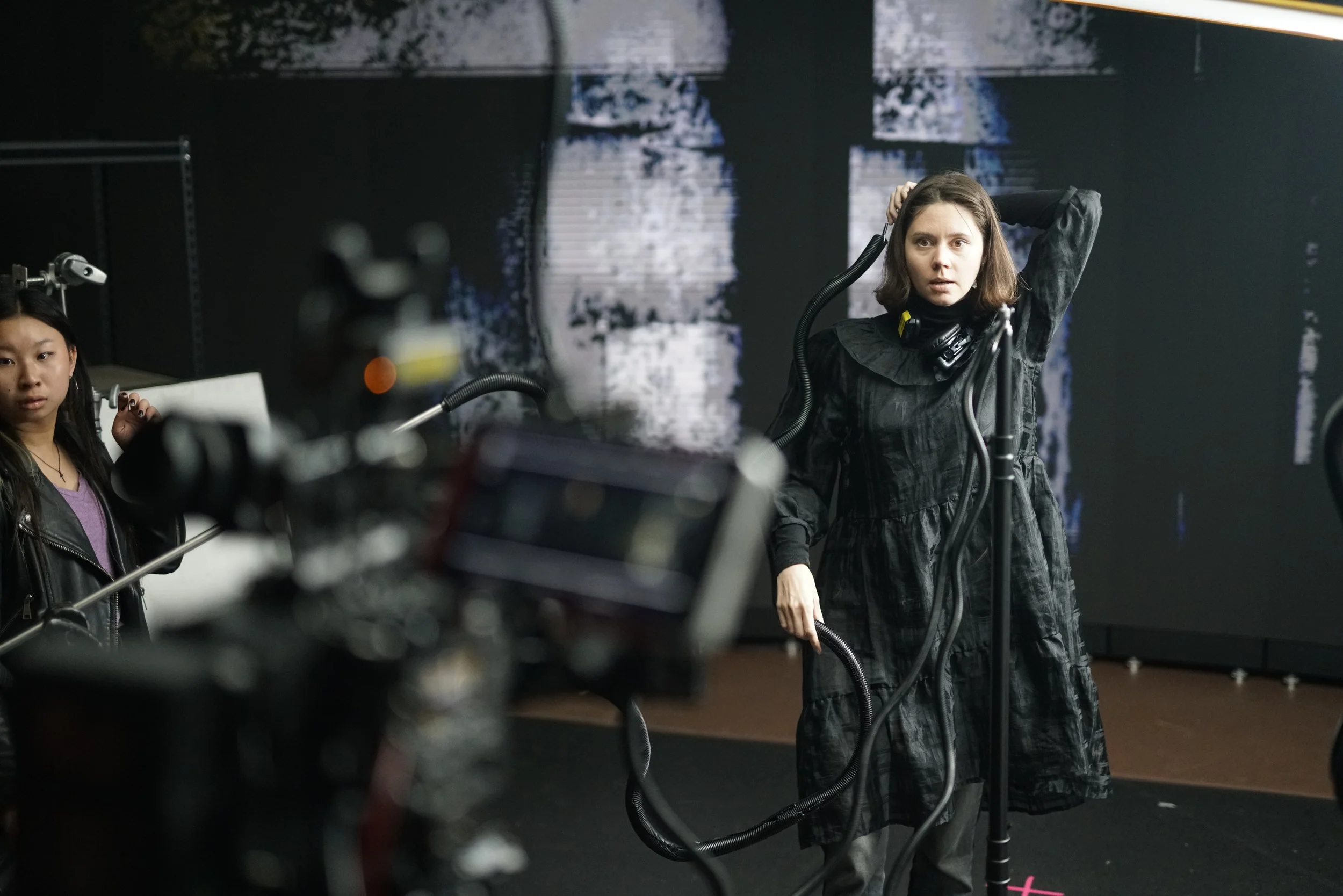
WLab films a short video using real-time rendering on the LED screen and an actor.
Now, what does it mean to be rendered in real-time? To be rendered in real-time simply refers to the constantly generating graphics of the scene. Take any first person video game; as you move and and interact with the game, the surrounding scenery changes and adapts to your movements and actions. Virtual production works in a very similar way, but instead of being in a game, you are in front of a large screen and your immediate movements determine what is being rendered on that screen, just like they would if you were a character directly in the game engine. That’s what virtual production is like; one large, dissected, customizable video game.
Of course, it’s all much more complicated than that, as it takes even practiced individuals considerable time to match lighting and shadows and prop placement to reflect what is being displayed on the screen. But, once all is set, the camera shouldn’t be able to differentiate between the tangible props, and the real-time renderings on the LED screen.
You may have already seen these techniques in practice and didn’t even know. Are you a fan of the Mandalorian? What about movies like Avatar: The Way of Water, Thor: Love and Thunder, or The Batman? They all use virtual production technologies. Pretty cool, right? It gets cooler.
Because virtual production works off of what is essentially a game engine, there are infinite possibilities to what can be displayed and rendered. Want a beach with a plane crash and rocky cliffs? Sure! Nevermind, give me a dingy house with a turned on lamp and two large windows. Done. With knowledge of Unreal Engine, the software used to create these virtual settings, anything can be created, changed, or destroyed on the LED wall. You have complete control.
What it does:
Now that we have established that virtual production is, let’s discuss what it does, what it is used for. How, you may ask, is this virtual production stuff any different from using a green screen? Or plopping in CGI material in post-production. In function, it’s not too different. The end goals are both the same: create scenery and visually enticing backgrounds or settings for a film. But, virtual production is the simpler, and quicker alternative to classic green screen technology.
In films of the past, CGI and post-production work was developed separately from live-action scenes and inserted into the scene after-the-fact. This method worked for decades and has given us beloved films. But, the separation of live-action footage and visual effects is time consuming and adds significant time and resources onto post-production.
Additionally, with CGI being rendered independently of live scenes, there’s more room for error and less flexibility in editing and changing these effects. In virtual production scenarios, a director could completely change a background or remove a significant visual effect in seconds, something that would take months to alter in CGI post-production.

NYU Tandon @the Yard combines real-time virtual production technology and motion capture.
The creative freedom and limitless possibilities of virtual production lend themselves usefully to creating dynamic and immersive environments and sets for media of all kinds. On WLab’s own LED wall, we have filmed short films, music videos, experimental media, and TikTok, just to name a few.
That brings us to my last point…
Why is it important?
Virtual production isn’t being heralded as ‘the future of film’ just for shits and giggles. No, it really is changing the landscape of filmmaking and film production.
The extensive creative ability and the efficient post-production capabilities of VP are making it an important film technology.
The combination of the quick post-production turnover time, and ability to make quick, even drastic, changes mid-scene would cut down on resources needed to produce high quality, visually complex films.
Directors no longer need to scout for locations, as they can make up any environment they want and project it into the wall. This is more environmentally friendly as well, as large crew sets are not disrupting natural environments. In addition, filmmakers can make on-the-fly decisions, utilizing virtual productions’ flexibility and creativity to the fullest extent to change and experiment with different virtual elements.
Not to mention the cost efficiency; without teams of post-production specialists, productions save time and money and still end with a visually stunning and immersive film experience.
But, above all, virtual production is an opportunity for innovation and experimentation within the film industry. The limitless possibilities and ever-developing technology ensures that filmmakers can make their visions, no matter how ostentatious, come to life before their very eyes.
Now that you know the basics of virtual production, would you consider trying it out? If you still want to learn more about what virtual production is, you can read the VP field guide here.
Maybe you would rather listen to industry professionals and creatives talk about their experiences in virtual production? I have that too.
Or, better yet, maybe you live in New York City and want to use a virtual production lab for a creative project of your own? Yeah, we can arrange that.
Article By Lea Filidore